Workflow enforcement Live
Freight broker workflow rules that live in the database
Every step of the freight broker process has a rule here. A load can’t reach Alerted, Carrier Dispatched, Freight On Board or Delivered until the proof is on file. The check runs in the database, so no screen or integration can skip it.
Checkpoint 1
Alerted
Carrier locked in
- Active carrier assignment
- Approved compliance status on the carrier
- Driver and truck recorded
- Tracking accepted
Checkpoint 2
Dispatched
Paper matches the deal
- Latest rate confirmation version signed
- A rate change after signature needs a new signature
Checkpoint 3
Freight on board
Proof it left
- BOL uploaded
- Freight photos uploaded
Checkpoint 4
Delivered
Proof it arrived
- POD uploaded
- Signer's first and last name
Why the rules sit in the database
Every brokerage has a version of this rule set: no dispatch without a signed rate con, no delivered without a POD. The trouble comes on a busy afternoon, when someone skips a step to get a truck rolling and the paperwork never catches up.
In FreightVero, a load’s status changes through exactly one database function. The status column itself is protected. The web app, an integration and someone typing SQL all go through that function and hit the same checks.
When a check fails, the database returns a structured reason, and the screen shows it word for word. We wrote about that design choice in why we put TMS rules in the database.
A checkpoint is only worth having if every condition on it earns its place. Truck number sat on the Alerted check for a while and it never earned that spot. A dispatcher with the driver and a phone number has what the load needs, and holding freight for a number nobody had yet only taught people to type something in to get past it. Truck number is optional now. The driver is still required.
The four checkpoints
Ten statuses run from New Shipment to Billed. Four of the moves between them require proof before the database allows them.
Checkpoint 1
Alerted
Carrier locked in
- Active carrier assignment
- Approved compliance status on the carrier
- Driver and truck recorded
- Tracking accepted
Checkpoint 2
Dispatched
Paper matches the deal
- Latest rate confirmation version signed
- A rate change after signature needs a new signature
Checkpoint 3
Freight on board
Proof it left
- BOL uploaded
- Freight photos uploaded
Checkpoint 4
Delivered
Proof it arrived
- POD uploaded
- Signer's first and last name
What each checkpoint requires
| Moving a load to | Required proof | Notes |
|---|---|---|
| Alerted | An active carrier assignment. An Approved compliance status on the carrier record. Driver details. Tracking accepted in Load Market. | Truck number is optional. A driver is still required. An authorized user can override the tracking requirement with a written reason, and the override is recorded in the audit log. A Large Straight Truck also needs a truck photo. |
| Carrier Dispatched | The latest rate confirmation version, signed. The signed copy is uploaded to the load. | If the rate changes after the carrier signs, the new version needs its own signature before dispatch. |
| Freight On Board | A BOL and freight photos on the load. | A BOL your own company issues is a separate document type and doesn’t satisfy this check. |
| Delivered | A POD, plus the signer’s first and last name. | A first name alone doesn’t pass. |
Load statuses in order: New Shipment, Alerted, Carrier Dispatched, Arrived Pickup, Freight On Board, Arrived Delivery, Delivered, Ready to Bill, Billed. Cancelled is the tenth.
The load tells your team what's missing
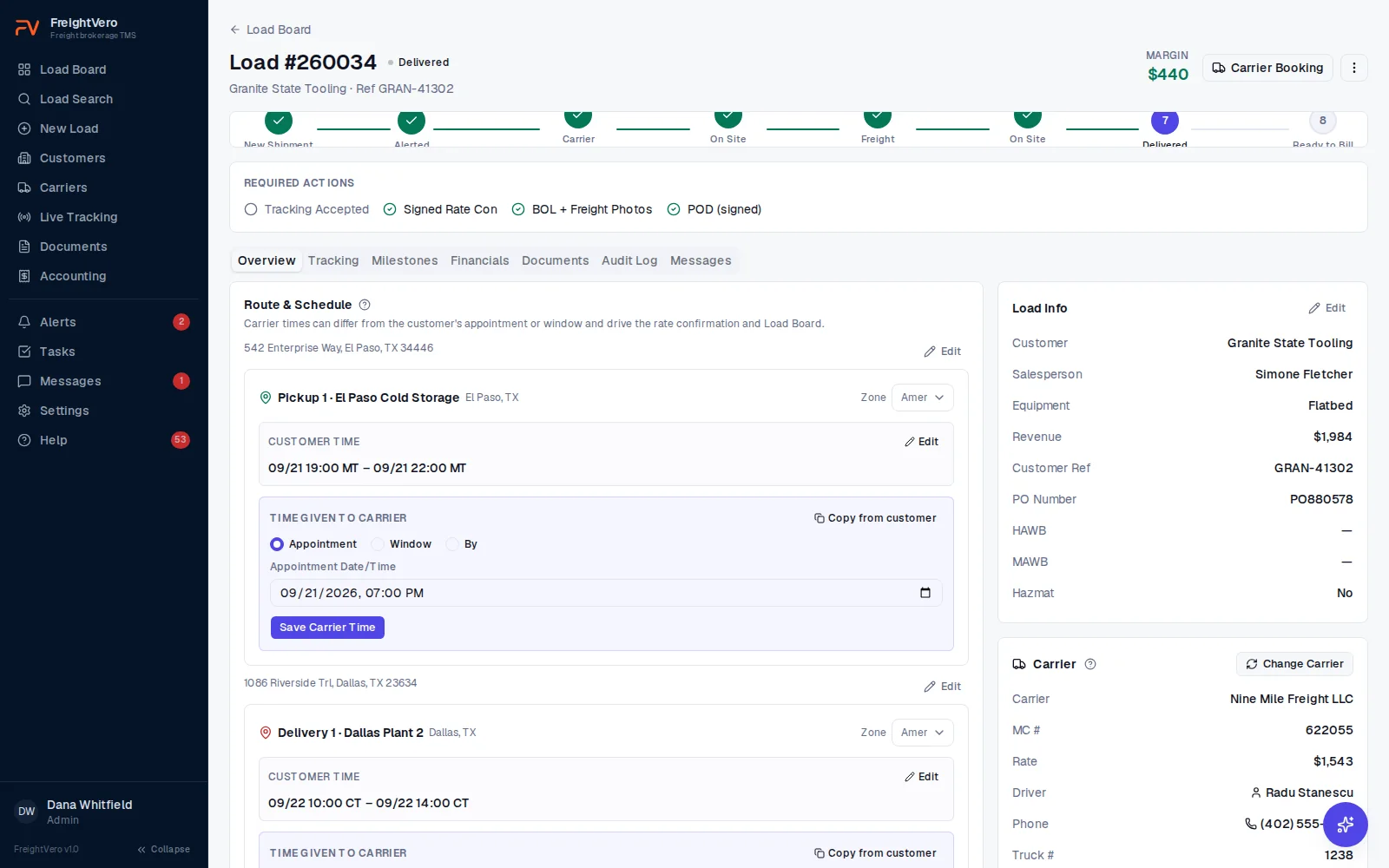
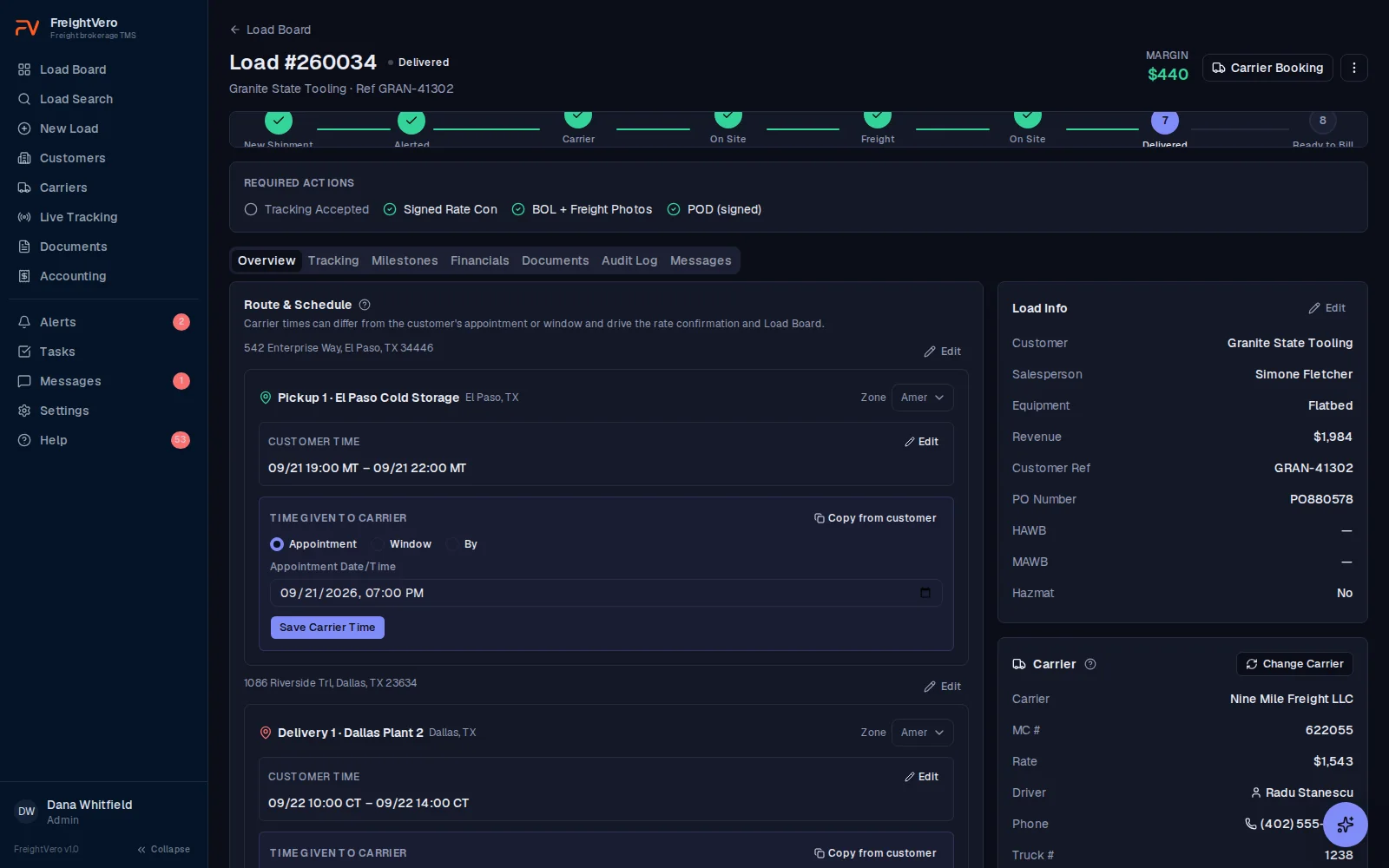
Every load shows a Required actions checklist under its status stepper: tracking accepted, signed rate con, BOL and freight photos, signed POD. Items check off as the proof lands on the load.
Nobody has to memorize the rules. A dispatcher in their first week sees the same list as the person who’s been booking freight for ten years.
- Refusal reasons shown exactly as the database returns them
- An alert when pickup is within two hours and the latest rate con isn’t signed
- The same checks for every user and every integration
When a carrier falls off
Fall-offs happen. When you swap carriers in FreightVero, the swap requires a reason. The old carrier assignment stays on the load as inactive, with that reason attached, so the load’s history shows who was on it and why they came off.
The previous rate con is voided, and the load drops back to an earlier status. From there, the replacement carrier goes through the checkpoints like any other: an Approved compliance status, driver and truck, tracking, and a signed rate con of its own. More on carrier records and swap history.
Rate con versions no one can overwrite
Every change to a rate confirmation’s terms creates a new version. Versions can’t be edited or deleted, by anyone. The dispatch checkpoint only counts a signature on the latest version.
For example: a carrier signs version 1 at $1,900. Before pickup, the customer adds a stop, and you agree to $2,150 with the carrier. Updating the rate con creates version 2, and the load can’t dispatch until version 2 is signed. The truck doesn’t roll on the $1,900 paper. See how rate confirmations work.
Milestone corrections leave a trail
Actual milestone times get fixed all the time. A driver reports arrival late, or someone keys the wrong day. FreightVero lets you correct them, through one correction step.
Editing a time that’s already recorded asks for a reason. The old value, the new value and the user who changed it go into the audit log. Writing a milestone time directly, around that step, is rejected.
Editing a load, and the log that makes it safe
Pieces, weight, commodity, addresses, stop times and the customer rate are all editable. Freight changes after booking, and a TMS that makes someone call support to fix a weight is a TMS people learn to work around.
The audit log is what makes that safe. Every edit writes the field, the old value and the new value, with the user and the time. Nothing changes quietly.
The log is append-only and the guard sits in the database. It holds against the app, against an admin, and against anyone with a database connection.
Deleting a shipment, and when it refuses
An Admin, or the person who entered the shipment, can delete it. Whoever made the typo is the one most likely to want it gone.
It refuses in three cases: an invoice has been raised, a rate confirmation has been sent to or signed by a carrier, or a carrier payment is on file. At that point the load is a business record, not a typo.
When it refuses, it names which of the three is the reason. A delete that fails without saying why sends someone hunting through the load for ten minutes.
The manual tracking override
Sometimes a driver can’t run tracking. The phone is dead, or the carrier declines it. FreightVero doesn’t pretend that never happens.
An authorized user can move a load past the tracking requirement with a manual override. The override needs a written reason, and it’s recorded in the audit log with the user and the time. Every override stays visible afterward, so you can see how often your team uses it and on which carriers.
An audit log no one can edit
The audit log is append-only. Each entry records who made the change, what changed, when, and the before and after values.
The database blocks edits and deletes on the log itself. That holds against the app, against an admin, and against anyone with a database connection. When a customer disputes a delivery time or a carrier disputes a rate, the record is the record.
Entries name what actually changed rather than logging a bare update. Real field names, money written as money, times in military local, and IDs resolved to the customer, carrier and user names they stand for. Fields that move on every save are hidden, so one change reads as one change. A blank reads as not set rather than a placeholder date. More on how data is protected on the security page.
Other rules the database holds
Load numbers never change Live
Each load number is assigned once, safely even when two people create loads at the same moment, and it can’t be changed afterward.
Billing rules captured at booking Live
A customer’s billing rules are copied onto the load when it’s created, so a later rule change doesn’t rewrite how an old load bills.
Users deactivated, not deleted Live
When someone leaves, their account is deactivated. Everything they did stays attached to the loads they touched.
Messages are append-only Live
Staff messages on a load can’t be rewritten after the fact.
Alerts record who handled them Live
An alert that cleared on its own is stored separately from one a person acknowledged.
Related pages
Watch a load get refused
Book a demo and we’ll walk a load through all four checkpoints, including the refusals and the reasons behind them.
Frequently asked questions
Can we turn off a checkpoint or add our own?
Not today. The four checkpoints work the same way for every company on the packaged TMS, and custom workflow rules aren't available yet. If your freight needs different proof at a status change, a custom TMS build puts your own rules in the database.
Does the compliance checkpoint verify carriers with RMIS or FMCSA?
No. The checkpoint reads the compliance status recorded on the carrier record, and it must be Approved. Your team sets that status after its own vetting. RMIS and MyCarrierPackets integrations are planned, not live. The carrier onboarding guide covers what to check.
Do the checkpoints apply to changes made by an integration?
Yes. Any status change goes through the same database function, whether it starts in the web app, an integration or a direct database connection. The protected status column can't be written around it.
What if the POD shows up days after delivery?
The load stays short of Delivered until the POD and the signer's first and last name are on file. The Required actions checklist shows the POD as missing, so the gap stays visible to operations and billing while you chase the paperwork.