Live
Load Market tracking, right on the load
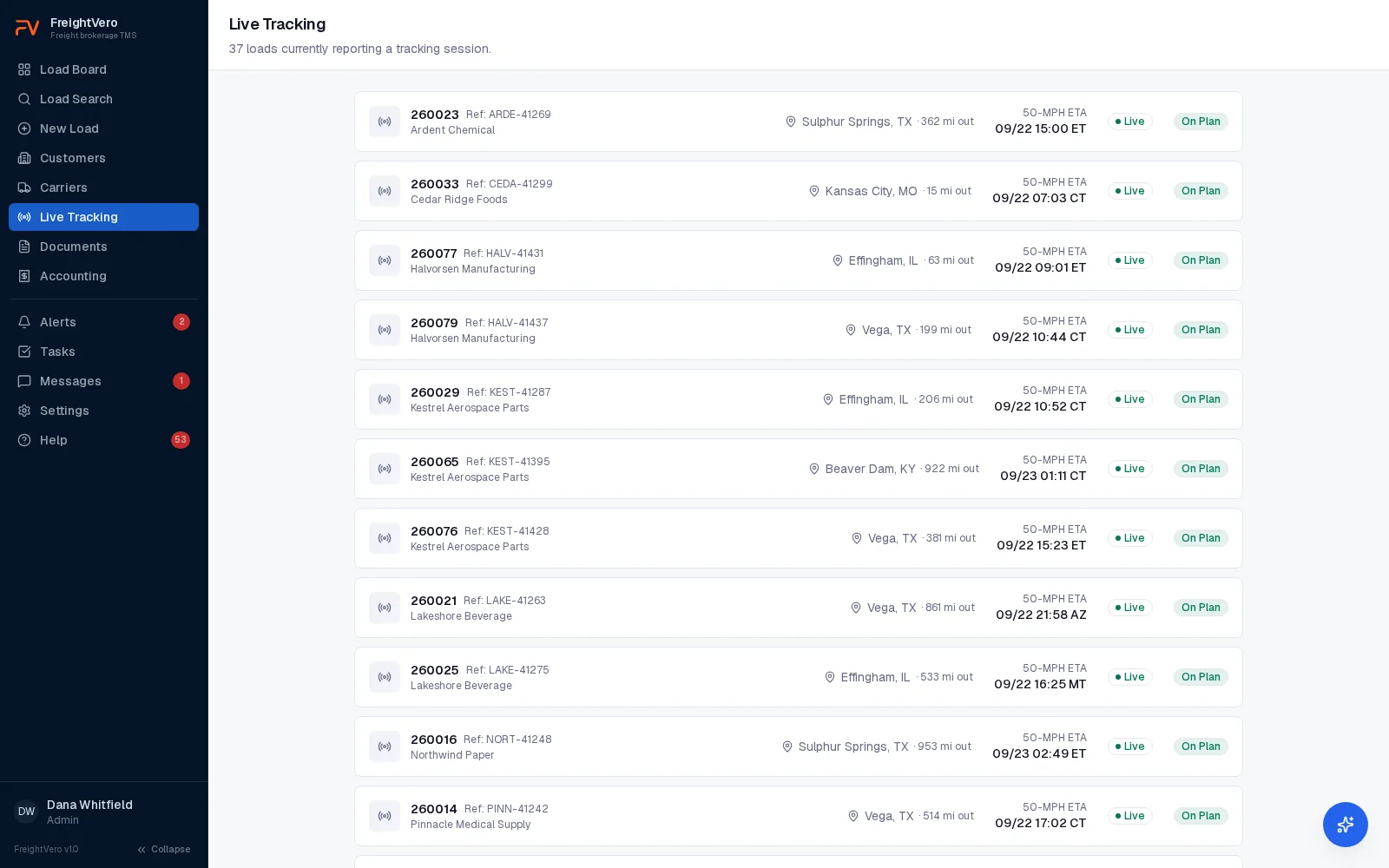
Send a tracking request to the driver’s phone from the load, then watch position, ETA and risk without leaving the FreightVero TMS. Live since September 3, 2026.
Short answer
Load Market is a freight tracking and visibility platform for brokers, forwarders and carriers. Drivers share their location through Load Market’s free app, or carriers connect an ELD. Brokers use it to cut down on manual check calls. In the FreightVero TMS, Load Market tracking is live and runs from the load record.
How it fits the load workflow
From the load, your team starts tracking with the carrier name and load number as the reference. The request goes to the driver’s phone, and the driver accepts in the Load Market app. Positions arrive on the load with city and state, and the ETA and risk badge update from there.
ETA comes from the truck’s last position, checked against the carrier’s appointment. Green, yellow, red. Tracking that goes quiet for 45 minutes gets flagged, and the load shows red on the live tracking list.
Tracking is also part of the checkpoints. Before a load moves to Alerted, the TMS needs an active carrier, an approved compliance status, driver and truck details, and tracking accepted. See how checkpoints work.
Positions and ETAs feed the rest of the TMS too: the alerts list, on-time and tracking coverage reports, and the Tracking agent. Live tracking and ETAs are included on every plan. See pricing.
What the integration covers
Start, stop and refresh Live
Control tracking from the load without logging in to a second system.
Driver changes Live
Reassign tracking to a new driver mid-load. The history stays, and it doesn’t use a second tracking credit.
Arrival updates status Live
A driver confirming arrival on site can move the load’s status.
Pauses show as problems Live
A driver pausing tracking marks it disconnected, so the load gets flagged instead of going silent.
Ends after delivery Live
Tracking stops on its own once a load is delivered. The tracking window runs up to 5 days.
Tracking alerts Live
Tracking red, disconnected and declined are raised as alerts, checked every 10 minutes and cleared automatically once resolved.
See tracking on a demo call
We’ll walk through the tracking list, alerts and a load’s tracking history with screens from the FreightVero TMS.
Frequently asked questions
Do drivers need to download an app?
Drivers accept tracking in the Load Market app on their own phone. Load Market also offers ELD connections for carriers that prefer to share location that way. The FreightVero TMS doesn't have its own driver app.
How often do positions update?
We don't publish a ping frequency. Positions are deduplicated as they arrive, and tracking that goes quiet for 45 minutes is marked disconnected. The check runs every 10 minutes, so a stalled load is flagged within the hour.
Can customers see the tracking?
Not today. Tracking is visible to your team inside the TMS. A customer-facing status view is part of the customer portal, which is in early access. Status emails are part of the Customer Update agent, which is live and sending today.
Does FreightVero work with MacroPoint or project44?
Not yet. Both are planned integrations and neither is built. Load Market is the tracking connection that's live today. See MacroPoint and project44 for what each integration is planned to cover.